Best Webflow Templates for SaaS in 2026: Complete Buyer's Guide
Your practical guide to choosing affordable SaaS website templates on Webflow...
Introduction
Launching a SaaS website shouldn't take months of development and tens of thousands in design costs. Webflow templates offer a powerful alternative—professionally designed, conversion-optimized websites that can be customized and launched in days, not months.
But with hundreds of SaaS templates available, how do you choose the right one for your business? This comprehensive guide evaluates the best Webflow templates for SaaS companies in 2026, comparing features, design quality, pricing, and use cases to help you make an informed decision.
Whether you're a early-stage startup needing to validate your product quickly, a growing SaaS company looking to refresh your brand, or an established platform seeking to improve conversions, this guide will help you find the perfect template.
What makes a great SaaS Webflow template?
Before diving into specific templates, let's establish the criteria that separate exceptional SaaS templates from mediocre ones:
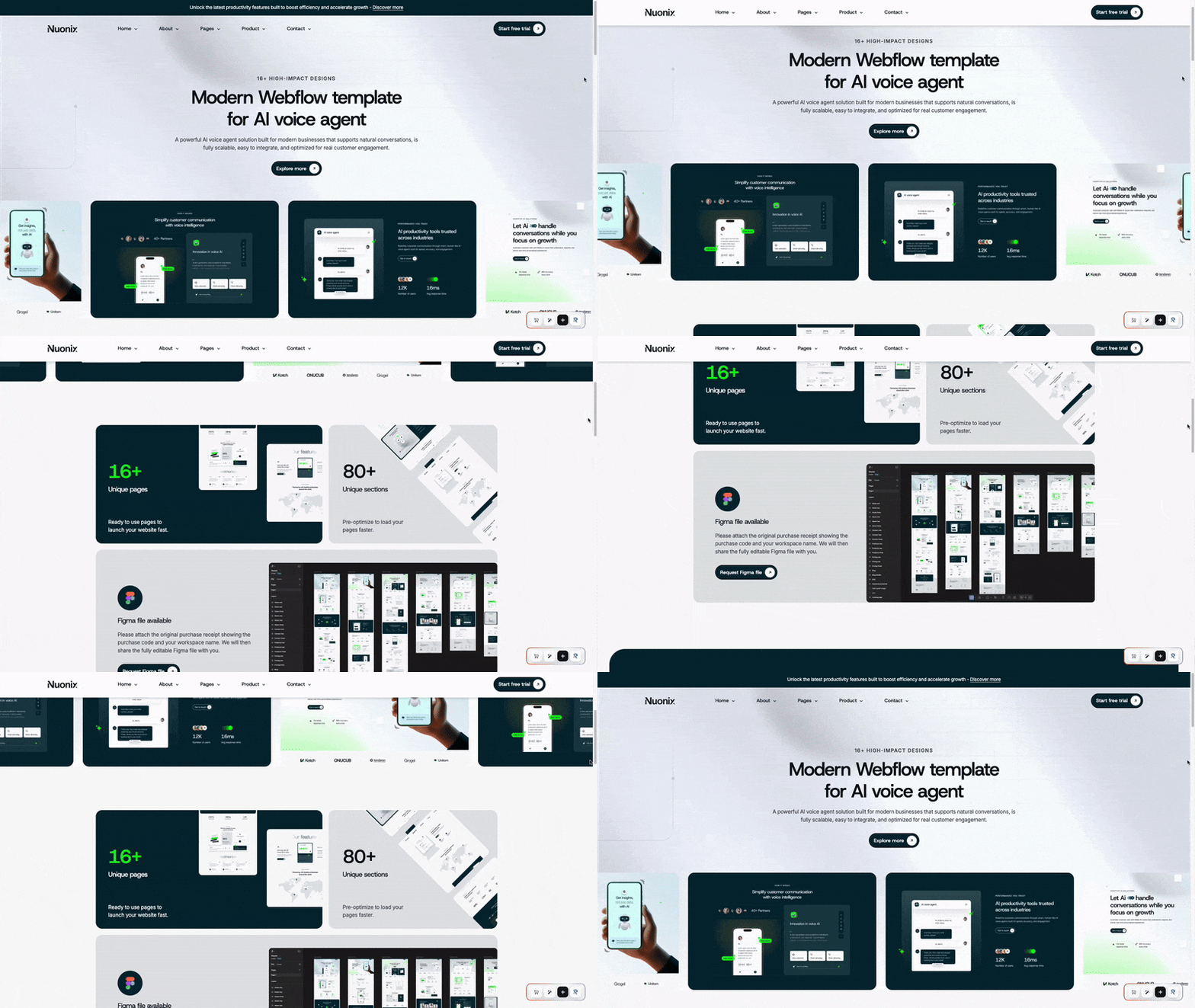
Nuonix stands out as one of the most comprehensive SaaS templates available in 2026. Designed specifically for modern software companies, it combines sophisticated design with powerful functionality.
Key features:
15+ pre-designed pages: Homepage, features, pricing, about, blog, case studies, integrations, contact, and more
Advanced CMS integration: Blog system, case study collection, integration showcase
Conversion-optimized pricing page: Multiple pricing tier layouts with comparison tables and FAQ sections
Customer proof sections: Logo walls, testimonial sliders, statistics counters
Mobile-first design: Fully responsive across all devices with optimized mobile navigation
Design highlights:
Nuonix features a clean, modern aesthetic with a professional color palette. The template uses strategic animations to guide user attention without overwhelming visitors. The typography is carefully selected for readability across devices, and the generous use of white space creates a premium feel.
Technical Specifications:
Page load time: ~1.8 seconds
Lighthouse performance score: 92/100
Mobile-friendly: Yes
Browser compatibility: All modern browsers
Webflow CMS: Fully integrated
Accessibility: WCAG 2.1 AA compliant
Best Use Cases:
B2B SaaS platforms
Enterprise software solutions
Project management tools
Analytics platforms
Collaboration software
Pros:
Extremely comprehensive page selection
Professional, polished design
Excellent documentation
Regular updates included
Strong conversion focus
Cons:
May be too feature-rich for simple products
Requires some customization for unique value propositions
Who Should Choose Nuonix
Nuonix is perfect for established SaaS companies or well-funded startups that need a professional, feature-complete website. If you're selling a complex B2B product with multiple features and integrations, Nuonix provides all the pages and components you need to showcase your offering effectively.
Scalifia is built with one primary goal: conversions. Every element, from the hero section to the pricing page, is optimized to guide visitors toward taking action. This template is ideal for SaaS companies in growth mode that need to maximize sign-ups and demos.
Key Features
Conversion-optimized hero section: Multiple hero layouts with prominent CTAs and social proof
Dynamic feature showcase: Tabbed interfaces, comparison tables, and benefit-focused layouts
Trust-building components: Customer testimonials, case study templates, security badges
Lead capture forms: Strategically placed throughout the template with customizable fields
Performance optimized: Lightning-fast load times with optimized images and code
Design highlights
Scalifia employs a bold, confident design language that immediately communicates professionalism. The template uses strategic color psychology—blues and purples for trust, green accents for CTAs—to guide user behavior. Animations are purposeful, drawing attention to key conversion points.
Technical specifications:
Page load time: ~1.6 seconds
Lighthouse performance score: 95/100
Mobile-friendly: Yes, with touch-optimized interactions
Browser compatibility: All modern browsers
Webflow CMS: Integrated for blog and resources
A/B testing ready: Easy to duplicate and test variations
Best Use Cases:
High-growth SaaS startups
Product-led growth companies
Marketing automation platforms
Sales enablement tools
CRM software
Pros:
Exceptional conversion optimization
Fast performance
Multiple CTA variations
Strong social proof sections
Growth-focused design
Cons:
Less page variety than some competitors
Design may feel aggressive for some brands
Who should choose Scalifia:
Choose Scalifia if your primary metric is conversion rate. This template is perfect for SaaS companies running paid acquisition campaigns, optimizing for demo bookings, or focused on rapid user acquisition. Growth teams will appreciate the built-in A/B testing capabilities.
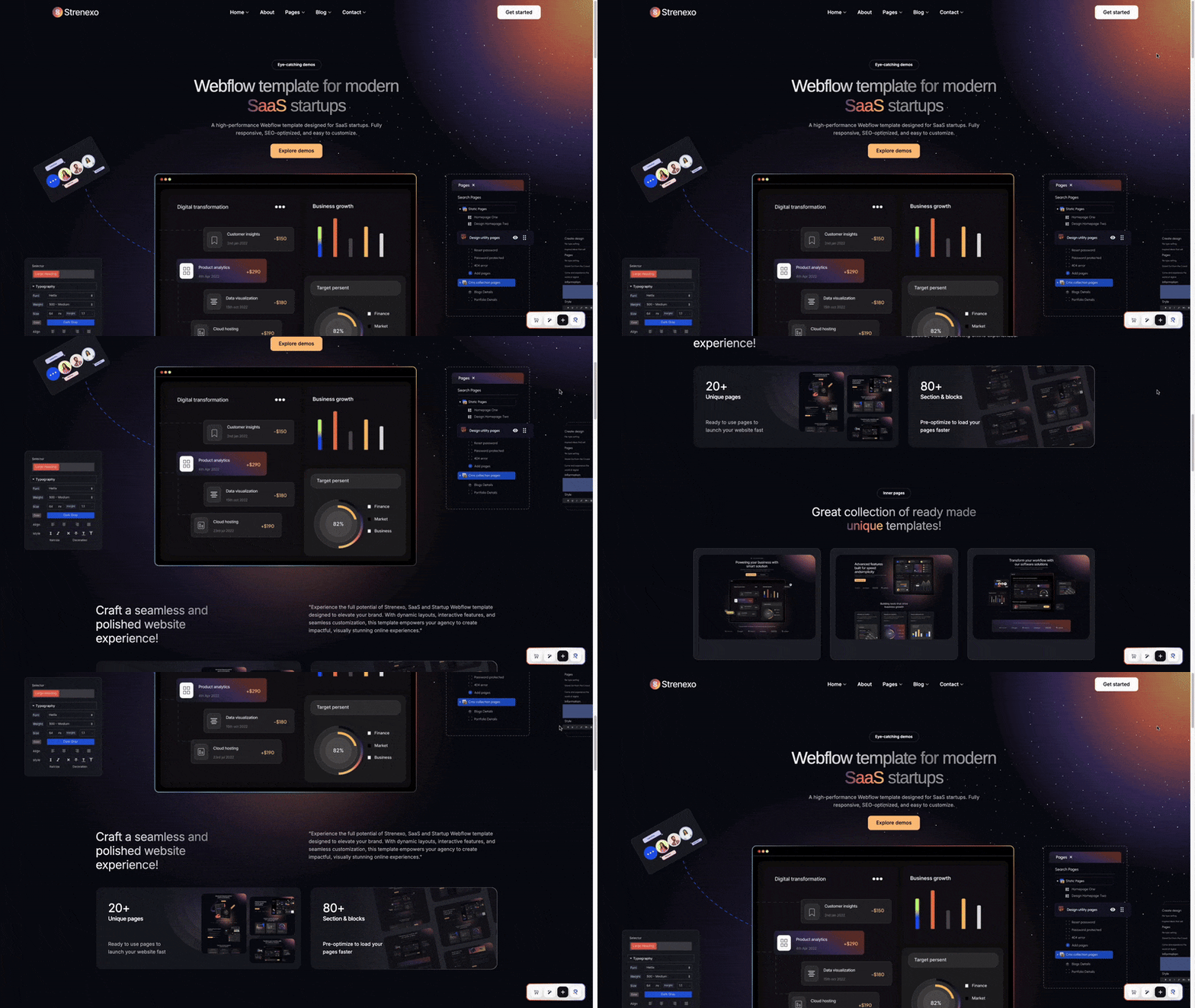
Strenexo offers exceptional value for early-stage SaaS companies. While priced lower than premium options, it doesn't compromise on design quality or essential features. This template is perfect for founders who need a professional presence quickly without breaking the budget.
Key features:
10+ essential pages: All core pages needed for launch (home, features, pricing, about, contact, blog)
Startup-friendly design: Clean, approachable aesthetic that builds trust with early adopters
Blog integration: CMS-powered blog for content marketing
Form components: Contact forms, newsletter signup, waitlist registration
Easy customization: Well-organized styles and components for quick branding updates
Design highlights
Strenexo embraces simplicity. The design is clean, modern, and unpretentious—perfect for startups that want to appear professional without seeming overly polished. The color scheme is flexible and easy to adapt to your brand, and the typography choices ensure excellent readability.
Technical specifications:
Page load time: ~1.7 seconds
Lighthouse performance score: 90/100
Mobile-friendly: Yes
Browser compatibility: All modern browsers
Webflow CMS: Basic blog functionality
Documentation: Comprehensive setup guide included
Best use cases:
MVP launches
Bootstrapped SaaS startups
Simple SaaS products
Developer tools
Niche B2B software
Pros:
Excellent price-to-value ratio
Quick to customize
Clean, professional design
Perfect for simple products
Lightweight and fast
Cons:
Fewer pages than premium templates
Limited advanced components
May need expansion as company grows
Who should choose Strenexo
Strenexo is ideal for founders and small teams launching their first SaaS product. If you're validating an idea, testing product-market fit, or operating with a tight budget, Strenexo provides everything you need to look professional and start acquiring customers. You can always upgrade to a more comprehensive template later as you scale.
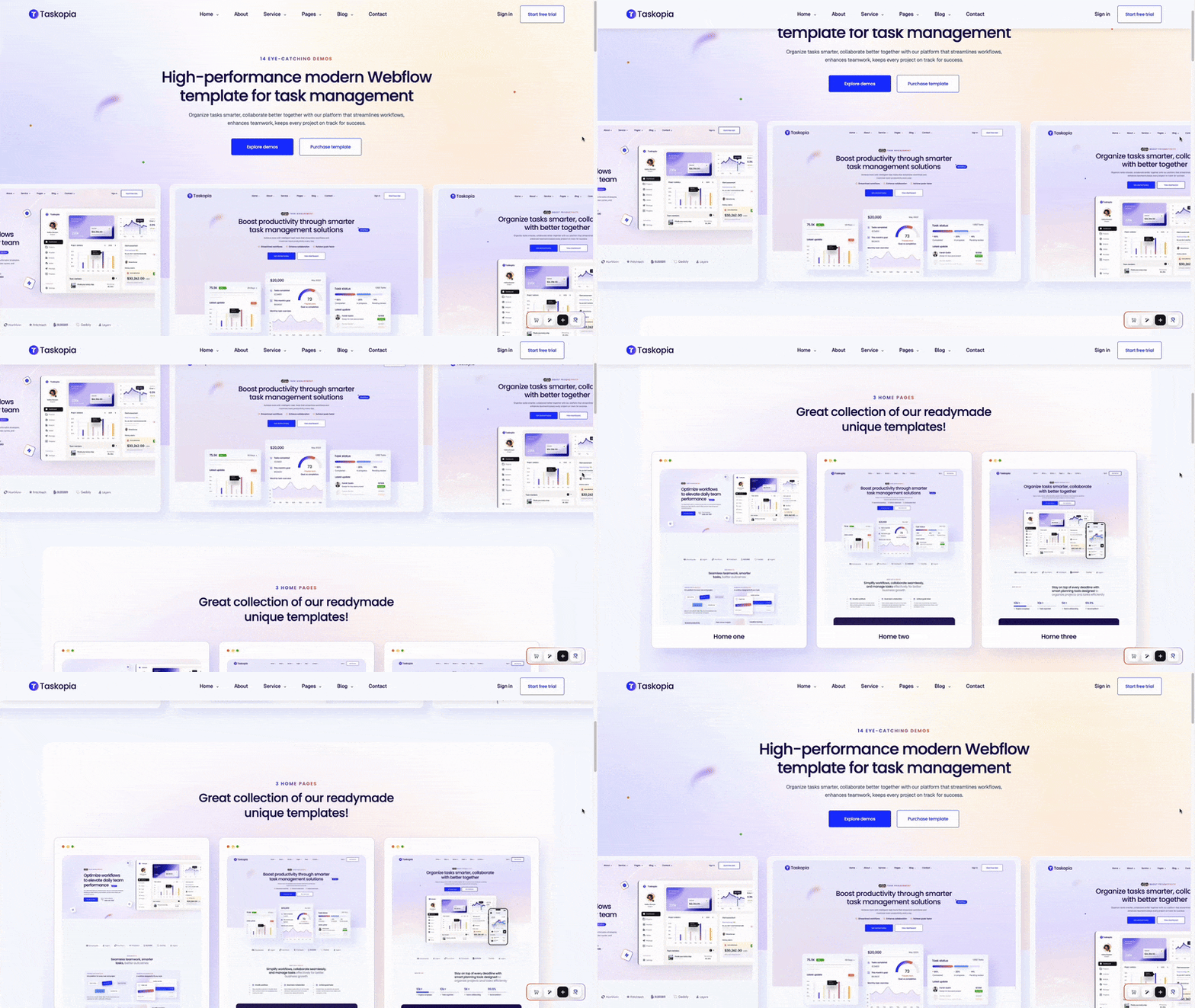
Taskopia is purpose-built for SaaS products in the productivity and project management space. Unlike generic SaaS templates, Taskopia includes niche-specific features and design elements that resonate with teams looking for productivity solutions.
Key features
Product demo sections: Interactive feature showcases with product screenshots and animations
Team & collaboration focus: Sections highlighting team features, integrations, and collaboration capabilities
Use case templates: Pre-designed pages for different user personas and industries
Integration showcase: Dedicated page to highlight third-party integrations
Resource library: Templates for help center, documentation, and knowledge base
Taskopia's design emphasizes clarity and organization—perfectly aligned with productivity software values. The interface-style components make it easy to showcase your product's dashboard and features. The color palette uses calming blues and energizing accents to convey productivity and efficiency.
Technical specifications
Page load time: ~1.9 seconds
Lighthouse performance score: 91/100
Mobile-friendly: Yes, with app-style mobile navigation
Browser compatibility: All modern browsers
Webflow CMS: Advanced blog and resource center
Video integration: Optimized for product demos and tutorials
Best use cases
Project management SaaS
Task management apps
Team collaboration platforms
Productivity tools
Workflow automation software
Pros
Niche-specific design
Excellent product showcase sections
Strong integration display options
Resource center templates
Professional, trustworthy design
Cons
May require significant customization for non-productivity SaaS
Design is specific to the productivity niche
Who should choose Taskopia
If you're building a project management tool, collaboration platform, or productivity app, Taskopia is purpose-built for your needs. The template understands the specific marketing challenges of productivity software and provides the exact pages and components you need. Teams selling to other teams will appreciate the collaboration-focused design.
Features needed: Security, compliance info, enterprise features, case studies
4. Evaluate technical requirements
Essential technical checklist
Mobile responsiveness (non-negotiable in 2026)
Page load speed under 2 seconds
SEO-friendly structure (proper heading hierarchy, meta tags)
Webflow CMS integration for blog/resources
Form functionality for lead capture
Browser compatibility testing
Accessibility compliance (WCAG 2.1 AA minimum)
Nice-to-have technical features
Animation and micro-interactions
Video integration capabilities
Third-party integration (Zapier, Make, etc.)
Multi-language support structure
A/B testing readiness
5. Budget considerations
Template costs (one-time)
Budget option: $79–99 (Strenexo)
Standard option: $129 (Nuonix, Scalifia, Taskopia)
Premium option: $149+
Beyond template costs
Webflow hosting: $15–39/month (Site plan) or $29–212/month (Account plan with CMS)
Custom development: $50–200/hour if needed
Design customization: $500–2,000 for professional branding
Content creation: $500–5,000 for copywriting and images
Total launch budget estimate
DIY launch (template + basic hosting): $150–300
Professional launch (template + customization + content): $2,000–5,000
Agency launch (template as starting point): $5,000–15,000
Webflow template customization guide
Once you've chosen your template, here's how to make it uniquely yours:
Step 1: Branding basics (Day 1)
Colors
Define your brand color palette (primary, secondary, accent)
Update Webflow global color swatches
Apply consistently across all pages
Test color contrast for accessibility (use WebAIM Contrast Checker)
Typography
Choose 1–2 brand fonts (Google Fonts or custom fonts)
Update heading styles (H1–H6) in Webflow
Set body text and paragraph styles
Ensure font licensing is appropriate for web use
Logo
Prepare logo in multiple formats (SVG preferred for web)
Replace template logo in navbar
Update footer logo
Add favicon and other branded icons
Step 2: Content strategy (Days 2-5)
Homepage
Write clear value proposition (10 words or less)
List 3–5 key benefits (not just features)
Add customer testimonials or early user feedback
Include trust signals (security, compliance, investors)
Features page
Organize features by user benefit, not technical specs
Include use case examples for each major feature
Add screenshots or product demos
Link to detailed documentation where relevant
Pricing page
Structure tiers based on customer research (don’t guess)
Highlight most popular plan
Include annual discount if applicable
Add FAQ section to address common objections
About page
Share your founding story (why you built this)
Introduce team with photos and real bios
Explain your mission and values
Include company milestones or traction
Step 3: Technical setup (Days 6-7)
SEO configuration
Set up page titles and meta descriptions for all pages
Configure Open Graph tags for social sharing
Create XML sitemap in Webflow
Submit sitemap to Google Search Console
Set up Google Analytics 4
Forms & integrations
Configure form submissions and notifications
Set up email marketing integration (Mailchimp, ConvertKit, etc.)
Test all forms across devices
Add form validation and error messages
Connect to CRM if applicable
Performance optimization
Compress all images (use TinyPNG or ImageOptim)
Enable Webflow's responsive images
Minimize custom code if possible
Test site speed with Google PageSpeed Insights
Optimize for Core Web Vitals
Step 4: Launch preparation (Days 8–10)
Quality assurance
Test on multiple browsers (Chrome, Safari, Firefox, Edge)
Test on various devices (desktop, tablet, mobile)
Check all links work correctly
Verify forms submit properly
Proofread all copy for typos and errors
Test checkout or signup flow end-to-end
Legal & compliance
Add privacy policy page
Add terms of service page
Implement cookie consent if required (GDPR, CCPA)
Add security badges or certifications
Include contact information and legal entity details
Pre-launch marketing
Set up social media sharing images
Create launch announcement content
Prepare email to existing list
Set up Product Hunt launch if applicable
Coordinate with any partners or affiliates
Common Webflow template mistakes to avoid
1. Not customizing enough
The mistake: Using the template exactly as-is without any customization.
Why it's bad: Your website will look generic and identical to competitors who bought the same template. Visitors may recognize the template and perceive your business as low-effort or unoriginal.
The fix:
Change colors to match your exact brand palette
Replace all placeholder text with original copy
Add unique graphics, illustrations, or photos
Customize layouts and spacing to create visual distinction
Remove any sections or components you don’t need
2. Overloading with features
The mistake: Including every page and component from the template because "it comes with it."
Why it's bad: Too many navigation items confuse visitors. Extra pages dilute your message and reduce conversion rates. Every page you add increases maintenance burden.
The fix:
Start with just 5–7 core pages (Home, Features, Pricing, About, Contact, Blog, Resources)
Remove navigation items you don’t need immediately
Add additional pages only when you have real content for them
Keep main navigation clean and simple
3. Ignoring mobile experience
The mistake: Only checking desktop view and assuming mobile "just works."
Why it's bad: Over 60% of SaaS website traffic comes from mobile devices in 2026. Poor mobile experience drives away potential customers and hurts SEO rankings.
The fix:
Test every page on actual mobile devices (not just browser preview)
Check that buttons are large enough for thumbs (minimum 44x44 pixels)
Ensure text is readable without zooming (minimum 16px font size)
Test forms on mobile—are they frustrating to fill out?
Check that mobile navigation is intuitive
4. Template content confusion
The mistake: Leaving lorem ipsum text, placeholder images, or example company names in the final site.
Why it's bad: Nothing says "unprofessional" like placeholder content. It suggests you rushed or don’t care about details—terrible signals for a SaaS company.
The fix:
Create a checklist of every text field and image
Systematically replace all placeholder content
Do a final "lorem ipsum" search before launch
Have someone else review the site with fresh eyes
5. Performance neglect
The mistake: Adding large uncompressed images, excessive animations, or heavy custom code without testing performance.
Why it's bad: Slow sites frustrate users and rank lower in search results. Every 1-second delay in load time can reduce conversions by 7%.
The fix:
Compress all images before upload (aim for under 200KB per image)
Use Webflow's responsive images feature
Limit animations to strategic moments
Test with Google PageSpeed Insights and aim for 90+ score
Check load time on slow 3G connection
6. Poor content hierarchy
The mistake: Making every section equally prominent or having no clear primary call-to-action.
Why it's bad: Visitors get decision paralysis. If everything is important, nothing is important. Conversion rates plummet.
The fix:
Identify your #1 goal for each page (usually signup, book demo, or start trial)
Make primary CTA visually dominant (size, color, position)
Use visual hierarchy to guide eyes down the page
Limit each page to 1–2 primary actions maximum
Webflow vs. other platforms for SaaS websites
Webflow vs. WordPress
Webflow advantages
No plugin conflicts or maintenance headaches
Built-in responsive design
Faster page speeds out of the box
No security vulnerabilities from outdated plugins
Visual editing without touching code
Hosting included and optimized
WordPress advantages
More template options available
Larger developer community
More third-party integrations
Typically lower cost templates ($40–80 vs. $80–150)
Verdict: Webflow wins for SaaS companies prioritizing speed, security, and modern design. WordPress is better if you need specific complex functionality or have a technical team managing the site.
Webflow vs. Squarespace
Webflow advantages
Much more customization flexibility
Better for complex layouts
More professional design options
Export code if needed
Better for SEO customization
Squarespace advantages
Easier for absolute beginners
All-in-one simplicity
Lower learning curve
Integrated e-commerce (better than Webflow's)
Verdict: Webflow is significantly better for SaaS websites. Squarespace templates feel too consumer-focused and lack the SaaS-specific components you need.
Webflow vs. custom development
Webflow advantages
10–50x faster to launch (days vs. months)
5–20x less expensive ($150–500 vs. $10,000–50,000)
Easy to update without developer
Professional design included
Proven layouts and conversions
Custom development advantages
Unlimited customization
Can integrate with any system
Truly unique design
Complete ownership of code
Verdict: Start with a Webflow template. Move to custom development only when you have significant traction and specific needs that templates can’t address. Most SaaS companies never need custom development.
SEO optimization for your Webflow SaaS template
Templates give you a professional design, but you must optimize for search engines.
On-page SEO checklist
Every page
Unique, descriptive page title (50–60 characters)
Compelling meta description (150–160 characters)
One H1 tag with primary keyword
H2–H6 tags in logical hierarchy
Image alt text for all images
Clean, descriptive URLs (/features not /page-2)
Internal links to related pages
Fast page load speed (under 2 seconds)
Homepage specific
Primary keyword in H1, page title, and first paragraph
Clear value proposition
Trust signals (customers, awards, stats)
Schema markup (Organization, Website)
Features/product pages
Feature-specific keywords in headings
Benefit-focused content (not just feature lists)
Screenshots or product demos
FAQ section for common questions
Links to pricing and trial signup
Pricing page
Keyword: “[your product] pricing” in title
Clear pricing information
FAQ schema markup
Comparison table with features
Trust signals (money-back guarantee, etc.)
Technical SEO configuration
Webflow settings
Go to Project Settings > SEO
Enable SSL certificate (HTTPS)
Set default meta title and description
Add Open Graph image (1200x630px)
Add favicon (32x32px and 512x512px)
Generate sitemap (auto-generated by Webflow)
Set up 301 redirects for any old URLs
Google Search Console
Verify domain ownership
Submit sitemap: yoursite.com/sitemap.xml
Monitor indexing status
Check for mobile usability issues
Review search performance data
Google Analytics 4
Create GA4 property
Add tracking code to Webflow (Project Settings > Custom Code)
Set up conversion goals (signups, demo requests)
Track button clicks on CTAs
Monitor page performance
Content marketing for SaaS
Templates provide structure, but content drives traffic.
Blog strategy
1. Keyword research
Find topics your customers search for.
Use tools: Ahrefs, SEMrush, or Google Keyword Planner
Mix: How-to guides, comparison posts, best practices
Content calendar (2–4 posts per month)
Week 1: Educational how-to guide (2,000+ words)
Week 2: Industry insights or trends (1,500 words)
Week 3: Tool comparison or “best of” list (2,500+ words)
Week 4: Customer story or case study (1,000 words)
Content quality standards
Minimum 1,500 words for ranking potential
Include images, screenshots, or diagrams
Add internal links to product pages
Include clear CTA to trial or demo
Optimize naturally with target keyword
Example topics for SaaS
“How to [solve problem your SaaS addresses]”
“Best [type of software] for [use case/industry]”
“[Your category] vs [competitor category]”
“Ultimate guide to [topic related to your product]”
“[Number] ways to [achieve outcome with your product]”
Template support and resources
Official Webflow resources
Webflow University
Free courses on web design and Webflow
Template customization tutorials
CMS and dynamic content guides
university.webflow.com
Webflow forum
Community support for technical questions
Template troubleshooting help
Share and get feedback on sites
forum.webflow.com
Webflow templates documentation
Official template guides
Cloneable projects for learning
Best practices and tips
webflow.com/templates
Template-specific support
Radiant Templates support
Comprehensive setup guides for each template
Video tutorials for common customizations
Email support for active subscribers
Figma files available for design customization
radianttemplates.com/support
Key support features
Response time: Within 24–48 hours
Includes: Technical issues, setup questions, best practices
Excludes: Custom development or design beyond template features
Access: Available throughout subscription period
Hiring help
When to hire a Webflow designer
Need extensive customization beyond template
Want custom animations or interactions
Require integration with specific tools
Short timeline and limited technical skills
Average costs
Template customization: $500–2,000
Full website from template: $2,000–5,000
Ongoing support/maintenance: $100–500/month
Where to find designers
Webflow Experts Network
Upwork or Fiverr (vet carefully)
Webflow Facebook groups
Recommendations from other founders
Frequently asked questions
Can I use a Webflow template for multiple projects?
Most template licenses allow use on multiple sites for the same organization or client work, but you cannot resell, redistribute, or share templates. Always check the specific license terms. Radiant Templates, for example, allows multiple project use but not resale or redistribution.
Do I need coding knowledge to customize a Webflow template?
No. Webflow’s visual editor allows you to customize colors, text, images, and layouts without writing code. However, understanding basic web design concepts helps. Complex integrations may require HTML/CSS knowledge or a developer.
How long does it take to launch a website with a template?
Basic launch: 3–5 days
Standard launch: 1–2 weeks
Professional launch: 2–4 weeks
Most time is spent on content creation and copywriting.
What’s included in a Webflow template purchase?
Typical inclusions:
Full Webflow cloneable project
All pages and components shown in preview
Style guide and component library
Setup documentation
Template updates (varies by seller)
Limited support period
Not included:
Webflow hosting
Custom development
Content creation
Ongoing support beyond initial period
Can I migrate from template to custom code later?
Yes. Webflow allows you to export HTML, CSS, and JavaScript. However, you will lose Webflow’s visual editor and CMS functionality after export.
Will my site look the same as others using the template?
Only if you don’t customize it. With proper customization (colors, fonts, content, layout adjustments), your site will look unique.
What if I need a feature the template doesn’t have?
Most SaaS needs can be handled with templates plus integrations.
How do updates work?
Update policies vary.
Radiant Templates:
Free updates for active subscribers
New components added over time
Bug fixes and improvements included
Email notifications for major updates
Other sellers may offer lifetime updates or limited-time updates. Always check before purchase.
Do templates work with Webflow CMS?
Most modern templates include CMS integration for:
Blog posts
Case studies
Team members
Resources/downloads
Product features
CMS requires a Webflow CMS site plan (starting at $29/month).
Can I get a refund?
Policies vary.
Radiant Templates offers a 30-day refund policy if you haven’t cloned templates. Industry standard ranges from 7–30 days with conditions.
Always preview thoroughly and review refund policies before purchase.
Conclusion: Choosing your perfect SaaS template
Selecting the right Webflow template is a strategic decision that impacts your ability to attract, convert, and retain customers.
Choose Nuonix if you need:
Comprehensive feature showcase
Enterprise-level professionalism
Extensive page selection
Maximum flexibility for growth
Choose Scalifia if you need:
Conversion optimization focus
Fast-growing startup demands
Strong marketing and sales structure
A/B testing capabilities
Choose Strenexo if you need:
Budget-conscious launch
Simple, clean presentation
Quick time-to-market
Room to grow later
Choose Taskopia if you need:
Productivity software positioning
Team collaboration focus
Strong integration showcases
Project management aesthetics
Final recommendations by scenario
Scenario 1: First-time founder, pre-revenue
Template: Strenexo ($99)
Hosting: Webflow Basic ($15/month)
Total first year: ~$250
Why: Minimize initial investment while maintaining professionalism.
Scenario 2: Funded startup, launching to market
Template: Nuonix or Scalifia ($129)
Hosting: Webflow CMS ($29/month)
Customization: $500–1,000
Total first year: ~$2,000
Why: Professional launch without overspending.
Scenario 3: Growing SaaS, scaling revenue
Template: Scalifia ($129)
Hosting: Webflow Business ($49/month)
Customization: $2,000–3,000
Copywriting: ~$1,500
Total first year: ~$6,500
Why: Invest in conversion optimization and content.
Scenario 4: Established company, rebranding
Template: Nuonix ($129)
Design partner: $5,000–10,000
Hosting: $29–49/month
Content strategy: $5,000+
Total: $10,000–15,000+
Why: Faster and more cost-effective than fully custom development while maintaining quality.
Taking action
This week
Define your business stage and primary goal
Review recommended templates
Preview thoroughly
Make your selection
Next week
Clone template into Webflow
Customize branding
Map page structure
Replace placeholder content
Weeks 3–4
Complete content writing
Add screenshots
Set up forms and integrations
Test across devices
Launch
Your template is a starting point, not a limitation. Combine smart template selection with strategic customization and continuous optimization based on real user data.
The perfect time to launch your SaaS website is now.
Additional resources
Recommended reading
Conversion Optimization for SaaS — Peep Laja
Obviously Awesome — April Dunford
The SaaS Playbook — Rob Walling
Useful tools
Google PageSpeed Insights
Hotjar
Figma
Grammarly
TinyPNG
Communities
Webflow Discord
SaaS Growth Hacks Facebook Group
r/SaaS on Reddit
Indie Hackers
About Radiant Templates
Radiant Templates specializes in premium Webflow templates for SaaS companies, agencies, and startups. As an official Webflow Premium Partner, they deliver professionally designed, conversion-optimized templates with comprehensive documentation and reliable support. New templates are added monthly, and subscribers receive updates and new releases included in their plan.
Explore the full collection: radianttemplates.com/templates
.webp)



.svg)